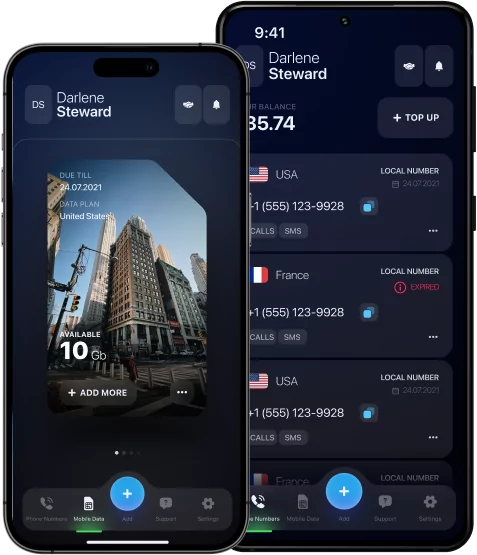

How to Connect Two Phones to One Number — Smart Solutions for Modern Users
In today’s world, mobile connection has become a key tool for work, communication, and travel. Sometimes one phone is not enough: work calls, private messages, and important notifications can get mixed up, creating unnecessary stress.
But what if one number can be used on two devices at once? This is convenient for entrepreneurs, active users, and anyone who values order and efficiency. Today, such features are available on both Android and iPhone through official carrier features and smart digital solutions.
In this article, let’s discuss in detail how to connect two phones to one number and choose the best way.



Why You Might Need to Connect Two Phones to One Number
There are several reasons why one number may be needed on two phones. This is often due to the separation of work and personal life: you can receive business calls on one device, and personal calls on the other, without missing important things.
Another scenario is a shared family number, when several family members use the same contact to communicate.
For those who travel a lot or work on multiple devices, connecting one number to two phones provides convenience and constant availability without unnecessary confusion.
*Discover: How to Find Who Owns a Phone Number? Working Lookup Methods.
How to Connect Two Phones to One Number — The Basics
The concept of connecting two phones to one number is based on a simple but effective principle: one contact is available on multiple devices simultaneously. Modern operators offer solutions via duplicate SIM cards, eSIM, or special digital services, and smartphones themselves support call forwarding and message synchronization functions. Thanks to these technologies, you get convenience and flexibility — calls and notifications arrive on both devices, and you control communication effortlessly.
How to Connect Two Phones to One Number iPhone
You can connect two iPhones to the same number using Apple’s built-in features. First, make sure that both devices use the same Apple ID and that iCloud is configured. Then activate the synchronization of calls via FaceTime: go to Settings → FaceTime and turn on Calls to iPhone.
To send messages to both devices, enable Send and Receive for your phone number and Apple ID in Messages.
Using iCloud and Apple ID Sync
With iCloud and a single Apple ID, you can sync calls and messages between two iPhones. To do this, both devices must be logged in with the same Apple ID and have iCloud enabled. In the Settings, go to the Messages section and activate Send and Receive for your number, and in FaceTime, turn on Calls to iPhone. After that, incoming calls and SMS will be displayed on both phones, allowing you to conveniently manage communication without skipping or duplicating actions.
How to Connect Two iPhones Using Dual SIM and eSIM
With eSIM and Dual SIM technology, you can use one number on two iPhones at once. The mobile operator issues a special eSIM profile, which is activated on the second device, while the main number continues to work on the first iPhone. After setting up, calls and messages are automatically synchronized between devices, which allows you to stay connected without having to constantly change SIM cards. This approach is ideal for work, travel, or separating personal and business communication.
How to Connect Two Phones to One Number Android
There are several ways to connect two Android phones to the same number. One convenient option is to use Google Voice: register a number in the app, and all calls and messages will be duplicated on both devices.
Also, many operators support duplicate SIM cards or call forwarding services: turn on Forwarding in the phone settings, and incoming calls will automatically arrive on the second phone. These methods allow you to stay in touch without missing a beat and conveniently manage work and personal calls.
Using Google Voice for One Number on Two Phones
Using Google Voice, you can link one number to multiple phones at the same time. After registering the number in the app, you select the devices on which you want to receive calls and messages. All incoming calls will be sent to these phones at the same time, and outgoing calls can be made from the same number. This approach is convenient for separating work and personal contacts, traveling, or running a business without having to change SIM cards.
*Discover: How to Check Phone Number Owner Name? Easy Online Ways of Searching.
Setting Up Call Forwarding Between Two Android Devices
On Android, you can set up call forwarding so that one number can be received on two phones. To do this, open Settings → Network and Internet → SIM cards or Phone → Call forwarding on the main device. Enable forwarding to the second phone by specifying its number.
After setting up, all incoming calls will be sent to both devices simultaneously, allowing you to stay connected without missing important calls.
Can You Use One SIM Card for Two Phones?
It is impossible to physically use one SIM card on two phones at the same time: it can only be installed in one device and process calls and data for it. However, digital technologies offer convenient alternatives. For example, eSIM, Google Voice, or call forwarding features allow you to receive calls and messages on multiple devices without having to carry a physical SIM card.
Using eSIM to Connect Two Phones to One Number
Using the UK data eSIM, one number can be used on two phones at once. The operator provides a digital profile that is activated on an additional device without interfering with the operation of the main phone. After setting up, all calls and messages arrive on both devices, which is convenient for work, travel, or separating personal and business contacts, while maintaining full control over communication.
Best Apps to Connect Two Phones to One Number
You can use some specialized apps to conveniently manage calls and messages on multiple devices:
- Google Voice — allows you to link one number to multiple phones, receive and make calls, and synchronize text messages.
- TextNow — provides a virtual number that works on multiple devices simultaneously, including calls and SMS.
- Skype Number — is a virtual Skype number from which you can make calls and receive messages on any device where your account is installed.
These apps provide a simple and flexible solution for users who need to stay connected without constantly changing SIM cards.
Security and Privacy Concerns When Sharing One Number
Sharing a single number on multiple devices increases convenience, but requires attention to security. When you sync calls and messages, data can become available on all connected devices, including call logs and text messages. This creates a risk of accidental viewing of other people’s messages or information leakage. To minimize threats, use strong account passwords, enable two-factor authentication, regularly check the list of connected devices, and restrict access to personal data. These measures will help you manage communications securely on multiple phones.
Conclusion — One Number, Two Devices, Unlimited Possibilities
It’s easier than ever to connect one number to two devices. Modern solutions such as eSIM, Google Voice, call forwarding, and synchronization on iPhone and Android allow you to receive calls and messages on multiple phones simultaneously. This provides maximum convenience, flexibility, and control over communication, allowing you to effectively manage work and personal communications.
One number on two devices opens up new possibilities for organizing your time and contacts.